
Get in Touch
-
Phone
+92-323-2833936
-
Email Now
info@zyniti.com
-
Office # 454 ST 9, Sector 48/A Korangi 1/2 Karachi, Pakistan


If you work remotely or spend hours on video calls every week, you already know the problem. Background noise kills your professional image. Messy notes slow you down after every meeting. And scrubbing through a two-hour recording just to find one key decision is a painful waste of time.
Krisp AI was built to solve exactly these problems. What started as a clever background noise cancellation app has grown into a full-featured AI meeting assistant that handles transcription, summaries, action items, and even real-time accent conversion. In this in-depth Krisp AI review, we break down every feature, the pricing, real-world performance, and whether it is genuinely worth your money in 2026.
Krisp AI is an artificial intelligence-powered communication tool that removes background noise from your microphone and speaker in real time. It operates as a virtual audio device on your computer, meaning it runs silently in the background without requiring you to install a plugin inside your video conferencing app.
Beyond noise cancellation, Krisp has expanded into a comprehensive AI meeting assistant. It now captures live transcripts, generates intelligent meeting summaries, extracts action items, records meetings without a bot, and offers accent conversion for global teams. It is compatible with Zoom, Microsoft Teams, Google Meet, Slack, Webex, and virtually any platform that uses a microphone or speaker.
Krisp is already trusted on over 150 million devices worldwide, which speaks directly to its reliability and adoption across industries ranging from startups to enterprise call centers.
This is the feature that put Krisp on the map, and it remains the best in its category by a significant margin. Krisp uses deep learning models trained on thousands of real-world noise environments to isolate the human voice from everything around it. Whether the interference is a barking dog, traffic noise, a loud café espresso machine, or a neighbor's leaf blower, Krisp removes it cleanly without distorting your voice or making it sound processed.
Unlike the basic noise filters built into Zoom or Microsoft Teams, Krisp handles complex and layered noise environments with exceptional consistency. Importantly, it works both ways: it cancels noise from your microphone so others hear you clearly, and it filters incoming audio so distractions from your colleagues' end do not reach your ears either.
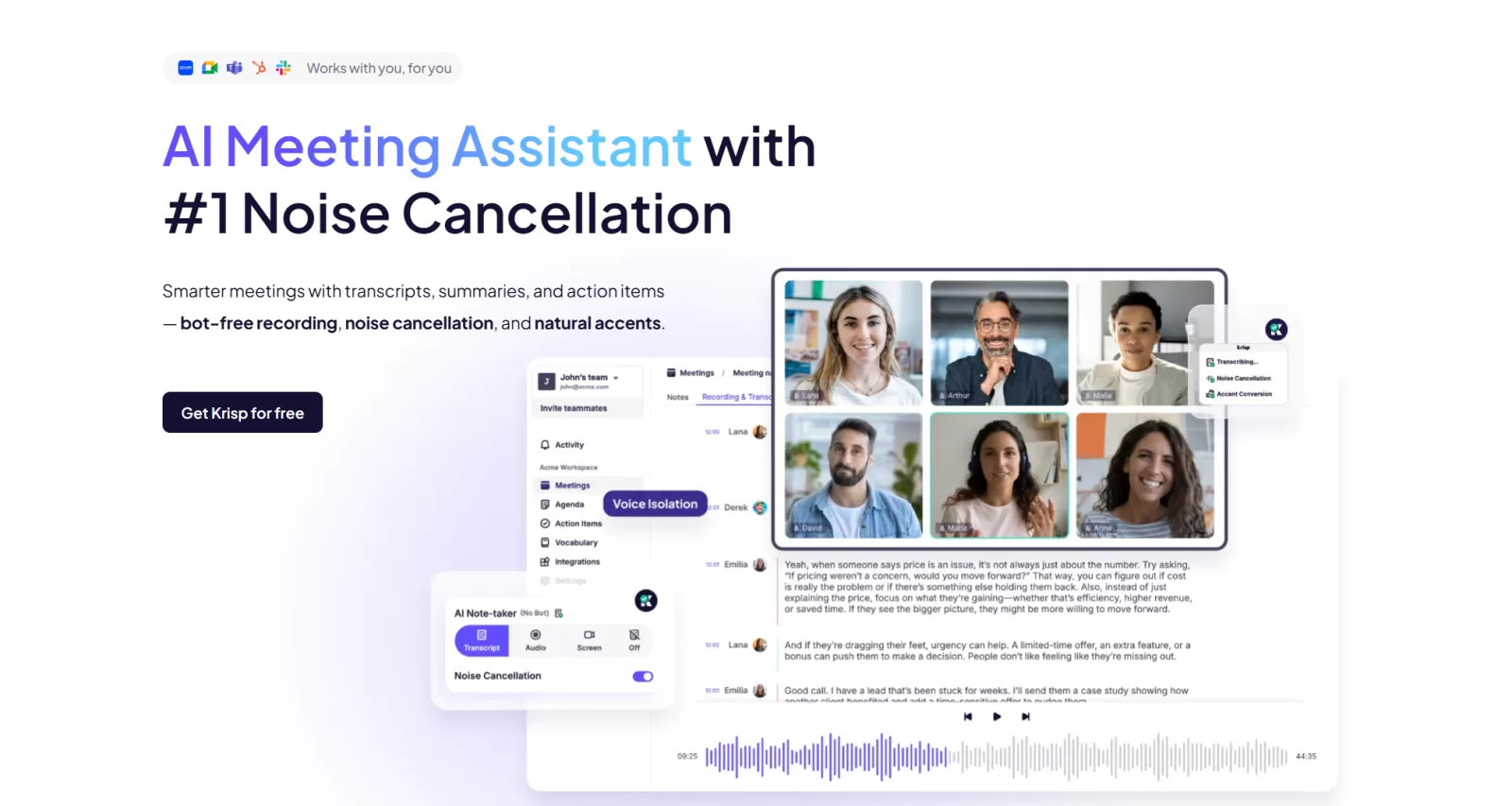
Krisp's AI notetaker solves a problem most competing tools ignore. There is no awkward bot joining your Zoom room with a name like "Otter Assistant" or "Fireflies Notetaker" that makes clients feel watched. Krisp runs entirely on your local device, capturing and processing audio quietly in the background.
The transcription engine handles multiple speakers with reliable accuracy, supports over 17 languages, and delivers searchable, exportable text within seconds of your call ending. For professionals dealing with technical jargon or cross-border teams with varied accents, Krisp's transcription holds up notably well. The output is clean enough to paste directly into Notion, Slack, or a project board without needing significant cleanup first.
After every meeting, Krisp automatically generates a concise summary that captures key decisions, main discussion points, and assigned action items. These summaries read in a natural, conversational tone rather than a robotic bullet list, which means you can share them directly with your team without editing them first.
For project managers, team leads, or sales professionals handling multiple calls per day, this feature alone can recover an hour or more of time that would otherwise go toward manual note-taking and post-meeting follow-up.
One of Krisp's more distinctive features is real-time accent conversion, designed specifically for global support and distributed engineering teams. Rather than altering a speaker's identity, the technology smooths regional pronunciation patterns so that listeners on the other end can follow along more easily in real time.
Krisp currently supports Indian English, Filipino, and Latin American accents, with more planned. For companies running international customer support operations or technical teams spread across multiple time zones, this feature directly improves communication clarity and reduces misunderstandings during live calls.
Krisp records your meetings locally, without a third-party bot ever entering the session. Recorded files are automatically synced with your transcript and summary so that instead of scrubbing through two hours of footage looking for a budget decision, you can jump directly to the relevant moment using the linked text.
This approach is cleaner, more private, and significantly more professional in client-facing situations where a recording bot joining the call can create friction or concern.
Krisp offers a flexible pricing structure designed for individuals, growing teams, and enterprise organizations.
There is a limited free plan that gives new users access to basic noise cancellation. For users who want the full platform, Krisp provides a 7-day free trial of its Pro plan with unlimited transcription, audio and video recording, unlimited noise cancellation, and AI-generated notes with action items included.
After the trial, the Pro plan starts at $8 per user per month, which is competitive positioning for what the platform delivers. The Business plan at $15 per user per month adds advanced admin controls, more storage, SSO and SCIM support, and enhanced collaboration features. Enterprise plans come with custom pricing, a dedicated account manager, domain capture tools, and expanded admin roles.
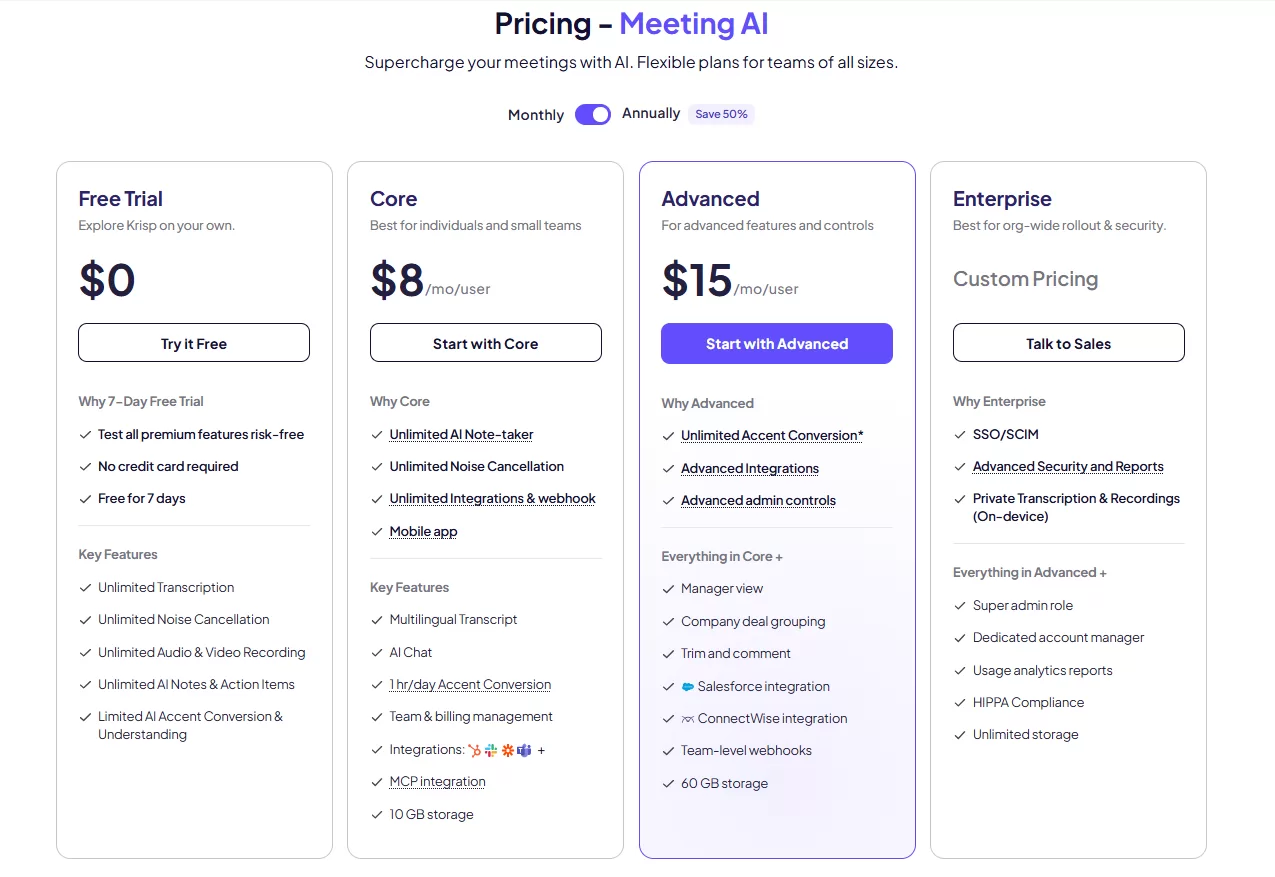
For solo professionals and small teams, the Pro plan is strong value. For larger organizations with compliance or security requirements, the Business or Enterprise tier is the right investment.
Krisp AI is purpose-built for remote workers, freelancers, startup teams, sales professionals, and any person who lives on video or voice calls. If your home office shares space with a busy household, Krisp's noise cancellation immediately elevates your professionalism on every call.
For customer support and call center teams, the combination of accent conversion and voice clarity features directly improves customer satisfaction scores. For project managers and team leads, the automatic summaries and action item extraction reduce the overhead that follows every meeting. For executives and consultants managing client relationships, the bot-free recording experience is a genuine competitive advantage.
Compared to Otter.ai, Krisp offers a more seamless real-time experience because it does not rely on a bot to capture audio. This makes it far less intrusive and noticeably more reliable in sensitive client environments. Otter.ai has a polished standalone note library and stronger third-party integrations, but Krisp's built-in noise cancellation gives it a meaningful edge for raw call quality.
Compared to Fireflies.ai, Krisp is simpler to deploy and does not require calendar integration to start recording. Fireflies offers stronger CRM pipeline integrations, but for teams focused on call clarity and clean meeting documentation, Krisp wins on day-to-day user experience.
Against Zoom's own AI meeting features, Krisp is platform-agnostic and significantly more capable in audio processing. Zoom AI is locked within its own ecosystem; Krisp works across every tool you already use.
Krisp AI is one of the few tools in this category that genuinely delivers on its promises across the board. The noise cancellation is the strongest available at this price point. The meeting assistant features are practical, well-integrated, and save measurable time every single day. The bot-free experience is a real differentiator in a market where most competitors make your calls feel surveilled.
The platform is not flawless. Accent conversion is still maturing and covers a limited set of regions. CRM integrations are not as deep as dedicated sales intelligence tools. But for the vast majority of professionals who want to sound better on calls and stop drowning in post-meeting admin, Krisp AI is a clear and well-priced choice.
If meetings are part of your daily work, this is a tool you will keep using six months from now, which is the truest test of whether any AI product is actually worth it.
Krisp AI offers a limited free plan with basic noise cancellation available at no cost. It also provides a 7-day free trial of its full Pro plan, which includes unlimited transcription, recording, AI notes, and summaries. After the trial period, paid plans begin at $8 per user per month.
Yes. Krisp AI is compatible with virtually every major communication platform including Zoom, Microsoft Teams, Google Meet, Slack, and Webex. It operates as a virtual audio device on your system, so it integrates seamlessly without requiring any plugin installation inside those apps.
Krisp AI delivers high-quality transcription with reliable speaker labeling and support for over 17 languages. It handles technical terminology and cross-accent conversations well. Accuracy may decrease slightly with extremely fast speech or heavily overlapping voices, but for the majority of professional meetings it is dependable and immediately usable.
Krisp processes noise cancellation on-device without routing your raw audio through the cloud, which provides an added layer of privacy. Meeting recordings and transcripts are stored securely on the platform. For enterprise customers, Krisp offers SSO, SCIM, and granular admin controls that align with corporate security and compliance requirements. Organizations handling sensitive data should review Krisp's security documentation before enterprise deployment.
Krisp AI includes real-time background noise cancellation, a feature Otter.ai does not provide. Krisp also operates without any bot joining your meeting session, making it far less disruptive in client-facing contexts. Otter.ai has a more developed standalone note library and stronger third-party integrations, but Krisp delivers a more complete real-time call experience for both audio clarity and automatic documentation.
Yes. Krisp AI is available across desktop and mobile platforms, including iOS and Android. A browser extension is also available, allowing users to take noise cancellation and meeting notes into any environment, whether they are switching between a laptop and a phone throughout the day.
Share your idea, business goal, or technical issue. We will review your message and reply with practical next steps.
Comments (0)
No comments yet,
Be the first to join the conversation.This discussion will show approved comments from readers.
Leave Your Comment: