
Get in Touch
-
Phone
+92-323-2833936
-
Email Now
info@zyniti.com


AI content creation tools are becoming more powerful, but many platforms still feel limited because they only solve one problem. Some are only for images, some are only for short videos, and some require multiple tools before you can create a finished piece of content. This is where Crano AI tries to stand out.
Crano AI is an all-in-one AI generation platform built for creating videos, images, and music from simple prompts or uploaded media. It is designed for content creators, marketers, businesses, designers, and social media teams who want to produce visual content faster without depending on heavy editing software.
In this Crano AI review, we will look at what the tool does, its key features, pricing, use cases, benefits, limitations, and whether it is a good choice for your creative workflow.
Crano AI is an AI-powered creative platform that helps users generate videos, images, and music using artificial intelligence. Instead of starting from scratch in advanced editing tools, users can enter prompts, upload images, choose styles, and let the platform generate content.
The main idea behind Crano AI is speed and convenience. A creator can turn a product image into a short video, create social media visuals from text prompts, generate AI music for content, or experiment with different visual styles in one place.
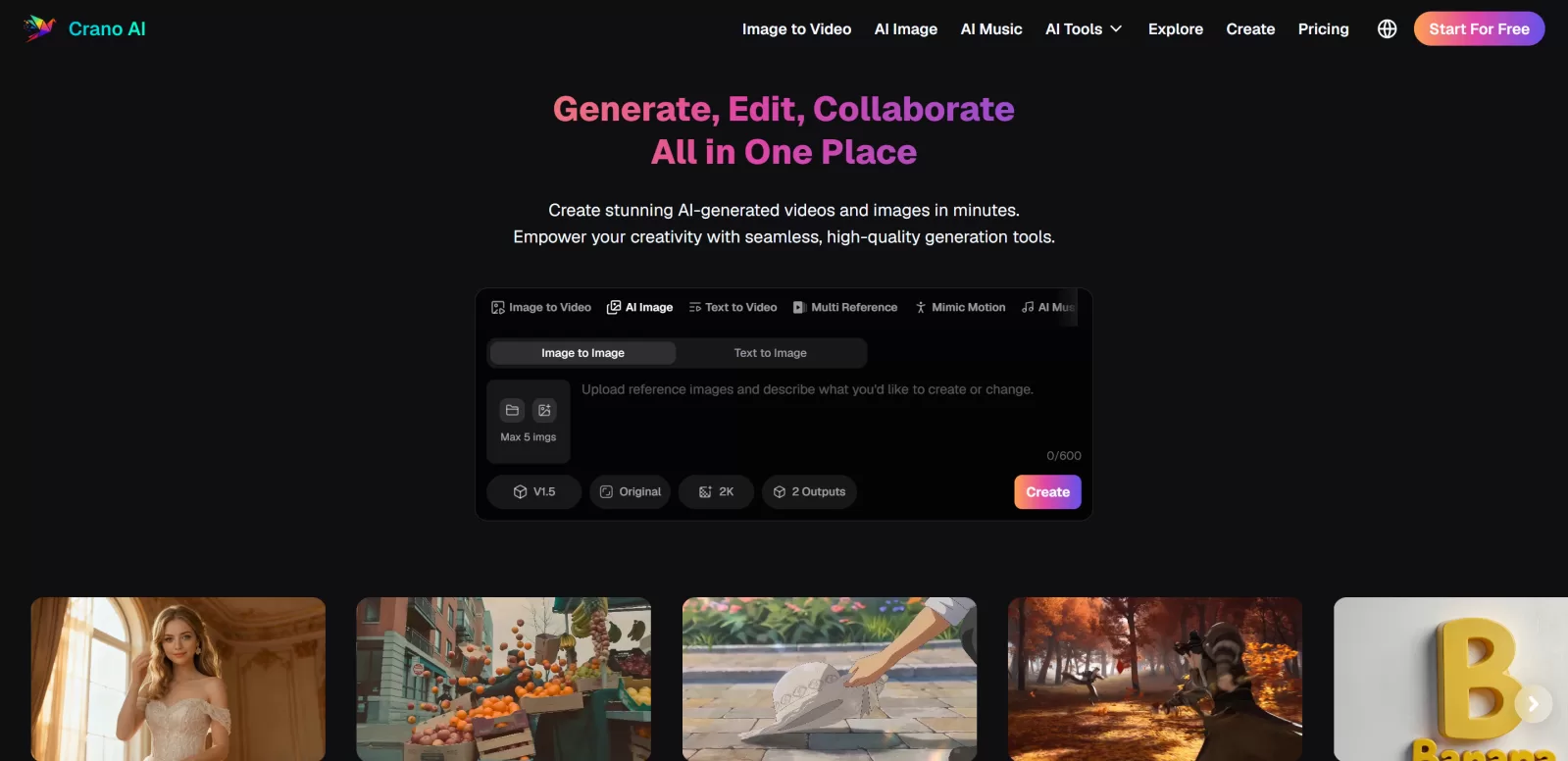
This makes it useful for people who need regular content but do not have a full design or production team. It is especially relevant for TikTok, Instagram Reels, YouTube Shorts, product ads, brand visuals, manga-style content, and short creative videos.
One of the strongest features of Crano AI is video generation. Users can create videos from text prompts or images. This is helpful for creators who want quick visual content without filming everything manually.
For example, a marketer can write a prompt describing a product scene and generate a short promotional clip. A content creator can upload an image and turn it into a moving video for social media. This can save time compared to traditional editing, especially for short-form content.
The image to video feature is useful when you already have a photo, product shot, character, or design and want to make it more engaging. Instead of posting a static image, you can create motion, depth, and a more dynamic presentation.
This is valuable for e-commerce stores, bloggers, YouTubers, and social media pages that want to reuse existing images in a more attractive format.
Crano AI also includes image generation and editing features. Users can create images from text prompts, edit existing images, and experiment with styles such as photorealistic, comic, cyberpunk, painting, and creative illustrations.
For bloggers and marketers, this can be helpful for generating featured images, social media graphics, ad creatives, thumbnails, and concept visuals. The platform also supports reference-based generation, which can help maintain better visual direction across multiple outputs.
Crano AI is not limited to visuals. It also includes AI music generation, allowing users to create music from text or lyrics. This feature is useful for video creators who need background music, short audio clips, or mood-based tracks for social media content.
Instead of searching through music libraries, users can generate music that matches the theme of their project. This can be useful for YouTube Shorts, Facebook videos, Instagram Reels, ads, and storytelling content.
Crano AI includes tools and templates aimed at fast content production. Its features support short videos, AI avatars, lip sync, animations, marketing materials, manga, manhwa, product showcases, and brand visuals.
This makes it more than a simple image generator. It works better as a creative toolkit for people who need different content formats from one platform.
Crano AI offers free access and paid plans based on credits. The paid plans include Lite, Pro, and Premium options. The Lite plan starts at a lower monthly price and includes a limited number of credits, while the Pro and Premium plans provide more credits and higher output options.
The paid plans are useful if you need watermark-free content, faster generation, more monthly credits, and better output quality. For casual users, the free option can be enough for testing. For marketers, agencies, and active creators, a paid plan may make more sense because video and image generation can use credits quickly.
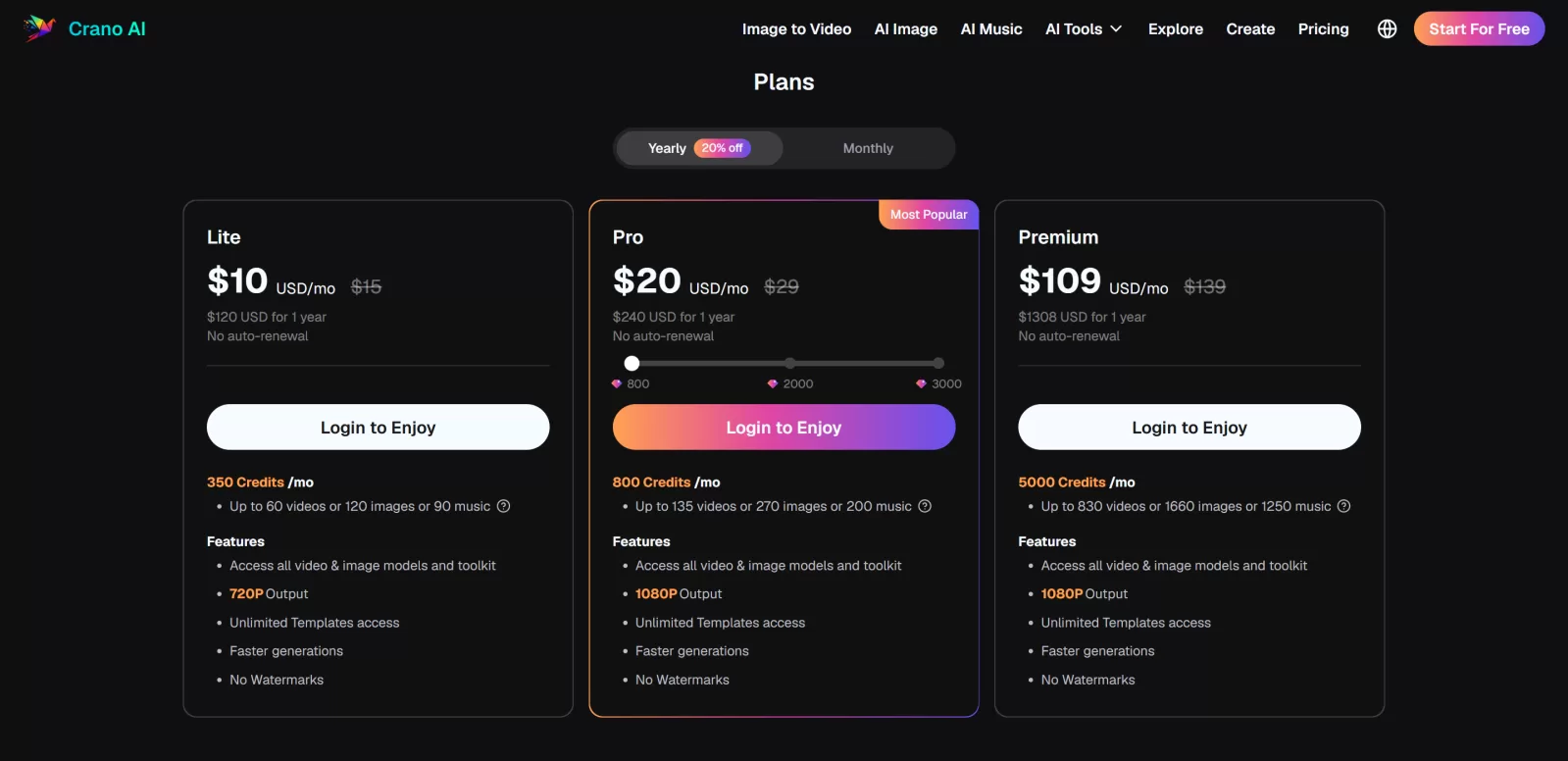
Before choosing a plan, it is better to estimate how often you will create videos, images, or music. If you only need a few visuals per month, start small. If you create content daily, the Pro plan may offer better value.
Crano AI is best for creators and businesses that need visual content regularly. Social media managers can use it to create short videos and post ideas. E-commerce brands can turn product photos into more engaging video assets. Bloggers can generate featured images and supporting visuals. YouTubers can create thumbnails, concept images, music, and short clips.
It is also useful for people who are not professional designers but still want polished creative content. The platform reduces the technical barrier, although good prompts and creative direction still matter.
Crano AI’s biggest advantage is that it brings video, image, and music generation into one workspace. This saves time and reduces the need to move between multiple tools. It is also useful for social media content, product promotion, creative storytelling, and visual experimentation.
The main limitation is that AI-generated results can vary. Some outputs may need regeneration or prompt adjustment. Users should also review generated content carefully before using it for commercial campaigns, especially when brand consistency, accuracy, or legal usage rights matter.
To get better results from Crano AI, write clear prompts. Instead of saying “make a product video,†describe the product, background, camera style, lighting, mood, and platform. For example, “create a modern 9:16 product video for Instagram Reels showing a black smartwatch on a clean desk with soft studio lighting and smooth camera movement.â€
For image generation, use references when possible. If you want a consistent character, product, or style, reference images can help guide the output. For music, describe the mood, pace, genre, and use case so the result fits your video better.
Crano AI is worth trying if you want an all-in-one AI tool for creating videos, images, and music without using several separate platforms. It is especially useful for short-form content creators, digital marketers, bloggers, e-commerce brands, and agencies that need fast creative assets.
It may not fully replace professional video editing or design work for high-end campaigns, but it can speed up idea generation, content production, and creative testing. For most users, the best approach is to start with the free option, test the output quality, and then upgrade if the credit limits and features match your workflow.
Crano AI is a practical AI content creation platform for people who want to move faster with videos, images, and music. Its biggest strength is convenience. You can generate multiple types of content from one place, which makes it helpful for social media, marketing, product promotion, and creative projects.
If you need a flexible AI tool for daily content creation, Crano AI is a strong option to test. It is simple enough for beginners but useful enough for creators and marketers who want to scale their visual content without spending too much time on manual production.
Share your idea, business goal, or technical issue. We will review your message and reply with practical next steps.
Comments (0)
No comments yet,
Be the first to join the conversation.This discussion will show approved comments from readers.
Leave Your Comment: